ISABELLA FREITAS' PORTFOLIO

UI Design
This blog is home to all the assignments and projects for VCDS320
Professor: Jason Dipopolo
Course Taken: Junior year, Fall semester 2025
Press this button to view all the summaries and notes on the chapter readings :)

Project 1: Concept Sketches
The concept sketches I made for the mobile apps I am considering to make are tools that would hopefully help me in day to day life.
1. A To Do list app where you can add images associated to each task to make it look more interesting.
2. A print app that would make it easier to send and prepare images to be sent to the printer.
3. A more customizable Clock app that lets you decorate it however you like.
4. A notes app designed for the purpose of making mind maps with different ways to connect text and images together.


Project 1: Prototypes
These are my prototypes for my 3 app designs. The first is my concept for my to do list app with features as an easy way to add tasks, being able to favorite tasks and archive past tasks in an archive. The second app is a clock app, showing a very abstract clock but also a simple version of the time at the top thats easier to read. Theres also a list of the most recent alarms set for easy access. The last app concept is a Mind Mapping app where you can make sticky notes, arrows to connect ideas, and customize options to draw, add images and stickers, all to make mind mapping easy and fun! These are my prototypes for my apps.
Project 1: Final design
For my final to do list design I decided to go with a colorful and light color scheme inspired by nostalgic consoles such as the Wii and the Nintendo DS with big bulky buttons, thin geometric text and white and blue background. Some of the functions I added to my prototype in Figma was the ability to check off tasks on the check list, vertically scroll through the tasks on the checklist, and open a new page to make a new task when you press the plus button and a chevron to back to the home page. Although it is a very simple app, and I had trouble making some of these features work, I feel like it turned out pretty well for my first attempt at using Figma.


Project 2: Wire Frames, Goals, and Flows
For my Personas I wanted to describe what I believed through my research what a Caregiver in a remote mission/humanitarian setting would need such as easy access and organization to all their information, maps, and other features that can be used offline in remote locations without service.
My goal is to make my app both simple to better work offline while also being able to store as much information as possible that the caregiver needs.
My wire frames include some of the main pages that the app will have including the login screen, homepage, map, and patient files/database. Those will be the main screens I will be working on for this app.

Project 2: High-Fidelity Designs
For this phase of my designs I really wanted to focus on layout and color palette, as well as showing off the most important screens of the app. I used the iOS assets to make my app. I decided of a warm earth tone color scheme to fit with the theme of nature, outdoors, and safety. Starting with the login screen it with display the logo and a simple log in button. Then in the home screen it displays the time, weather, and nearby missions and emergency alerts to know right away if someone is in trouble and needs assisting. The bottom tool bar also has icon buttons for emergency messages, calls, the home button, map, and files. This bar will appear on every screen.Then next is the patient file screen, showing all current and past patient files as well as the ability to create new ones quickly. The final screen shown here is the map screen, mainly showing a topographical map and will have icons and a legend to know where the user is as well as near by hospitals and emergency centers.
Project 2: Final Designs
For my final I really wanted to add all the small details and elements to my design. I designed a logo for the Login screen and decided on the name Wild Care for the app. On the home screen I but a chevron to go back to the login screen. Also on the home screen it shows the time in military time, the weather with a simple icon from the apple assets, and emergency alerts from people who are in need of medical help near by. The emergency alerts are similar to amber alerts that are sent out immediately to those with the app near by including details about the situation, coordinates and other immediate essentials. Also within the app you can view a topographical map which is the most common used by hikers and outdoorsmen in order to view accurate land elevations and potential obstacles, the map also includes icons to represent the user, near by medical centers, and near by emergencies, as well as a search bar to put in coordinates. And finally the patient files, a place for the care giver to organize and keep record of past patients. This app is made to be as simple as possible for the best use without any service. Some elements like the call, messages, and patient files might require the care giver to need service to access and save files to a cloud. But the rest of the app such as the Emergency Alerts, Time, weather and map are all things that can be used offline especially when used on a satellite smart phone which can better be used while offline. This app is meant to be a simple and convenient place for these off the grid care givers the ability to better do their jobs.
Project 4: Ideation
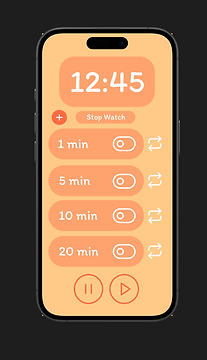
Idea: for my application I would like to make a timer app that works as a clock, stopwatch and timer. This timer app would be specifically for exercises, and has the option to loop a timer as well as a way to pause or continue the clock. I feel like this would be a helpful tool for a wide variety of people.
Colors: I went with warm oranges, reads and whites to make it feel encouraging and fun.
Font: The font is Itim which also helps the app feel playful and enjoyable.
Project 4: Figma Make First Draft
For my first draft of the application I decided to make, Time Out. I made a simple timer app with some unique features like to loop timers and stackable timers. This app would be useful for artist, athletes, and many other uses. My first draft on Figma Make was very successful, after just a few tweaks asking the AI my app was functioning exactly how I imagined. You can add and delete customizable timers, loop and refresh timer, pause and play both the stop watch and timers at the same time, and you can see the actual time at the top. All I plan to add to my next draft is more branding, maybe a landing screen, and a custom logo.
Project 4: Research and Final App
Once I finished making my app I put together a user research document with some questions and instructions for people to try my app and give me feedback on what to change or fix. I got ten people to test my app and critique it and the reviews were very good! Lots of people said it was pleasing to look at, easy to use, useful and intuitive with only a few small pieces of feedback. It was great to see people using the app for everyday things like cooking, practicing their music and simple exercises to name a few.
I also had the time to create a branding guide, showing the colors the app uses, the fonts, the logo, and some mockups of the app and how it would look on a phone or computer. This makes it feel real and how it would looks practically on a device.
Overall my app is very simple but I wanted it to be as complete and polished as possible and work on the little gritty details to make sure it works smoothly and looks the best it can be. On the app you can add new timers, edit timers, move timers around, a ring will go off when a timer ends, you can loop timers, refresh timers, delete timers and pause timers. There is also a stopwatch to time yourself and you can use the stopwatch and the timers at the same time and both respond to the same start and pause button. You can also pause individual timers using the toggle, it won't restart the timer until the time runs out or you press refresh. And to add a little fun detail, when you press the logo at the top it will ring like a clock with a sound and animation. I put a lot of love and care into thjis app even though at face value it may seem very simple, but I truly honed in on the quality.

Try out Time Out!
The best timer app :D
Press to see my
research and feedback